Phone Storage Full? Do This Before You Delete Your Photos
That storage warning is a bad time to decide which photos to keep. Here’s what to copy, what to check, and what you can safely clear.
NP
News PolitePublished 20 November 2026 · 6 min read
The pCloud Black Friday offer ends November 28, 2026.
Affiliate disclosure. This post contains affiliate links. I may earn a commission if you buy through them.
Your phone runs out of room halfway through recording a video. You open the gallery to find something you can delete, then realize you don’t know which of those files you’ve backed up. Start with the big videos you already want to keep. Copy a few, play them from the backup, and only then clear the copies on your phone.
I bought pCloud’s 500 GB Lifetime plan in 2021 and have used it for about five years. I started with phone photos, then added desktop backups and work folders. I’ve upgraded roughly every two years as those folders grew. A few friends bought a plan after I showed them how I dealt with a full phone.
The same decision comes up when a client sends a new batch of product photos and your laptop is still full of last month’s shoot. I decide what I need to work on now, what I need to be able to find later, and what would be impossible to replace.
Free up your phone by starting with a few videos
Find the biggest files. Check your phone’s storage breakdown. If photos and videos are using the space, pick a few large clips you want to keep. If apps or downloads take up most of the storage, start there.
Copy them and check them. In the pCloud app for iPhone or Android, enable Automatic Upload and include existing media. Let the upload finish on Wi-Fi. Open a few photos from pCloud and play the videos you plan to remove.
Clear the copies you’ve verified. Use Free up device storage if it’s available in the app, or remove the confirmed local copies from your gallery. pCloud’s Automatic Upload is one-way, so a photo you delete from your phone stays in pCloud once it has uploaded. Keep a second copy of anything irreplaceable.
For a family camera roll, I’d pull out the clips and albums you’d want to find again years later and group them by year or event. Start with a single trip or birthday. It’s easier to see how the process works when you know exactly which photos you’re looking for.
Photographers can keep the originals and share a clean gallery
After a wedding or portrait session, a folder of RAW files and a gallery of finished JPEGs serve different purposes. Keep the current shoot on your working drive while you edit. When it’s delivered, archive the RAW files and final exports in separate folders under the same shoot date and client name. Share the finished gallery only.
That structure pays off when someone asks for another print or a different crop months later. You can go straight to the original. Before reusing a memory card, verify the copies of the shoot and keep another independent copy of the originals.
Videographers can give the footage a home after delivery
A 4K project can fill a drive with camera footage, recorded audio, proxies and several exports. I’d keep the active edit and its media on a fast local drive. At delivery, collect the source footage, audio, project file and final export into one archive. Record which editor version or plug-ins you used if they matter for reopening it. Proxies and render caches can usually be recreated, so check whether you need to keep them.
Before deleting the working copy, restore a sample clip and check that the saved project can find its media. A project file by itself is of limited use if the clips it points to are missing.
Web developers can find the right product photo months later
In web development and SEO, an ecommerce client can send me thousands of images and videos in one handoff. For one product, I might have the full-resolution photos, cropped versions for the store and an approved video for a landing page. I keep Originals, Web-ready and Approved in separate folders and name files by SKU when the catalog uses one. That gives me somewhere to look when the client needs a new crop or brings a discontinued product back.
I use pCloud’s desktop Backup for selected folders and Sync for active files I need offline. Sync keeps a local copy and mirrors changes in both directions, including deletions. When I want to reclaim disk space, I put completed work in a separate archive in pCloud Drive, check that it opens on demand, then remove the local working copy. I keep an independent backup of work I can’t replace.
Project managers can give the next person one handoff folder
Picture a website launching on Friday, with sign-off in email, release notes in chat and the final files on a teammate’s laptop. A handoff folder can hold the approved deliverables, the sign-off record and a short note with the owner, date and any open items. Set up the share link for the people who need the handoff and check that they can open it. Keep internal drafts and confidential material outside the shared folder.
The test is simple. If the project lead goes on leave on Monday, can someone else find what went live and who approved it?
Small business owners can pull a receipt or price list without digging
A shop owner might have supplier invoices in email, product photos on their phone and last year’s price list on a laptop. A year-and-month folder for invoices and receipts makes it easier to prepare records for the accountant. A separate folder for current product photos and price lists gives staff a clear place to find the version they should use.
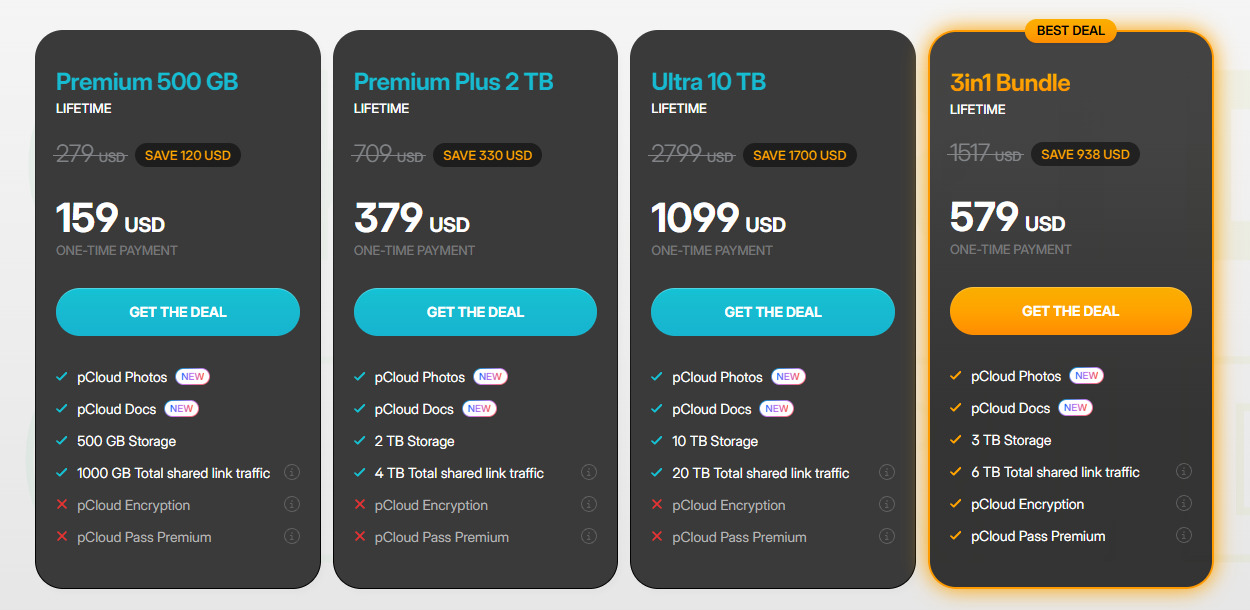
For documents you’re authorized to store and want to protect with client-side encryption, check the 3 TB bundle. It includes pCloud Encryption for files placed in the Crypto Folder and comes with pCloud Pass Premium. The 500 GB, 2 TB and 10 TB standalone plans offer pCloud Encryption as a separate purchase.
How much storage would I buy?
Check the size of your phone library, desktop folders or existing archives before choosing. For recurring work, measure something you can picture. If a typical shoot takes up 40 GB and you keep one a month, that’s about 480 GB a year before finished exports. That tells you more about whether 500 GB is enough than the size of your phone alone.
A video archive that already takes up several terabytes
I may earn a commission if you buy through the pricing image.
I started with 500 GB because it covered what I needed at the time. If you’ve measured your files and have room to grow, check the 500 GB Lifetime offer for $159 USD. The offer is a one-time payment and saves $120 against the $279 price pCloud lists alongside it. pCloud defines Lifetime as 99 years or the account holder’s lifetime, whichever is shorter. Check the final price and currency at checkout.